
Websites built using WordPress can be particularly resource-heavy for a variety of reasons, including increasing levels of traffic, the use of resource-heavy plugins, or large and growing databases. As a site continues to grow, the host’s plans and server resources will eventually be outgrown as well. One of the main causes of performance issues on WordPress sites is the use of high-traffic plugins or a high volume of traffic, content, and/or media files. Dedicated Servers for WordPress Hosting provide a solution to these issues by allowing complete control over all resources on a physical server.
Choosing the best dedicated server configuration requires analyzing many of the same factors as choosing the best VPS configuration. The main differences are the compute and storage resources. The performance of the server’s CPUs, amount of RAM, speed and type of storage, and the network all need to be taken into account when deciding on a configuration.
The best configuration will depend on the expected growth and the current levels of traffic and resource use of a website. This guide will look at the configurations suitable for different kinds of sites, the essential features of a dedicated server, and performance and security practices essential to help sites handle growth and be reliably hosted.
What Is a Dedicated Server for WordPress Hosting?
A dedicated server for WordPress hosting is a physical server rented by a customer to run their own WordPress websites. Unlike shared hosting, where many customers share a single server, each customer in a dedicated hosting environment gets a physical server to themselves. As a result, a customer using a dedicated server can configure and deploy the server resources in any way they wish.
A dedicated server can power a number of WordPress websites, resource-intensive plugins, large and complicated databases, and provide additional server resources for caching. Further, the server can be tuned to strictly enforce security policies and to deliver a number of different server configurations based on load balancing needs.
It is also important to note that while a customer has their own dedicated server, that doesn’t mean the customer is provided managed WordPress hosting. For a customer to have their server fully managed by the hosting company, they would need to pay for a managed WordPress hosting service, in addition to the cost of renting a dedicated server. However, many managed WordPress hosting services now include a dedicated server as part of their managed hosting service.
Why Choose a Dedicated Server for WordPress?
WordPress websites can opt for a dedicated server for a range of reasons, including resource requirements and flexibility. Flexibility refers to the extent to which a hosting service allows customers to modify the server’s configuration to suit the website’s needs. Here are the key considerations.
Dedicated Computing Resources
With a dedicated server, the website has exclusive access to the physical server’s resources, namely the CPU, RAM, and storage. Compared to shared or virtual hosting, where multiple customers share a single or virtual server, dedicated hosting reduces the number of unrelated customers competing for the same resources. This can result in more predictable performance for resource-intensive WordPress sites.
Better Performance Potential
A high-end dedicated server can address all the performance needs of a WordPress site. This is especially true if NVMe SSD storage and enough RAM are installed. A dedicated server can provide strong speed and performance for WordPress sites; however, there are other configurable options that can limit the performance of the server, including WordPress code, plugins, and traffic patterns.
Greater Control and Customization
Administrators have more control when configuring the operating system, web server, and PHP and database settings as compared to shared hosting. This offers the developer more control and flexibility in configuring a hosting environment to meet specific needs.
Improved Isolation and Security Control
Dedicated hosting provides a higher level of isolation from other customers at the physical server level. Administrators can implement custom firewall rules, access control lists, and security policies. Although having a dedicated server reduces the exposure from other customers, it does not eliminate vulnerabilities and threats. Regular security updates and monitoring the server for vulnerabilities are best practices.
Support for Growing Websites
Dedicated hosting can better accommodate businesses and organizations with growing and demanding online presence, such as large WooCommerce stores and blogs with high traffic, as well as membership websites and agencies hosting multiple client websites. With an appropriately sized server and proper optimizations, businesses can handle a growing workload and better control their hosting environment.
Best Dedicated Server Configurations for WordPress Hosting
A business website that hosts a blog may not need a lot of resources, and a configuration at the lower end may be sufficient. A news website or an online store may require a lot of processing and memory power and storage. Knowing the resources required helps a website owner choose a server configuration that meets their needs without overpaying for resources that are not required.
The following configurations may be used to compare dedicated servers for different WordPress usage scenarios.
| Server configuration | Best suited for | Key considerations |
| Entry-level dedicated server | Growing blogs and business websites | Modern multi-core CPU, 16–32 GB RAM, NVMe SSD |
| Performance-focused server | High-traffic WordPress websites | Strong CPU performance, 32–64 GB RAM, fast NVMe storage |
| High-memory server | WooCommerce and database-heavy websites | 64 GB RAM or more, CPU capacity, database optimization |
| Multi-site server | Agencies and multiple WordPress installations | RAM, CPU capacity, account isolation, backups |
| Enterprise-grade server | Large publishers and high-volume stores | High-performance CPU, substantial memory, redundancy, monitoring |
These specifications are illustrative starting points, not fixed requirements. Actual resource needs depend on traffic patterns, caching, plugins, concurrent users, and database activity.
Best Dedicated Servers for Small-to-Medium WordPress Websites
Dedicated servers may be an option for business websites and blogs that have outgrown shared and VPS hosting. An example configuration for such a scenario may be a server with a modern multi-core CPU, 16-32 GB RAM, and NVMe storage.
While growth typically demands more hosting resources, a business should analyze resource usage and find performance bottlenecks before purchasing more hardware.
Best Dedicated Servers for High-Traffic WordPress Websites
High-traffic WordPress sites should utilize resources as efficiently as possible in order to accommodate as many requests as possible. Additionally, page and database caching can reduce the requests required of a server. For effectively processing requests, a dedicated server with 32 to 64 GB of RAM, fast storage, and a fast CPU would be a good fit.
As far as PHP processing is concerned, the number of available workers can also limit the number of dynamic requests a server can process. Too few workers can cause a request queue to form, while too many workers can increase server memory usage. It is beneficial to evaluate a server’s workload and benchmarks to determine the best configuration.
Best Dedicated Servers for WooCommerce Stores
WooCommerce websites generally require more resources than informational websites because of product searches, dynamic customer sessions, checkouts, and other activities that require database interactions and processing.
A well-configured server that has sufficient CPU and RAM capacity can support a WooCommerce store. For protection of business-critical data, store owners should ensure backups are scheduled, and tests are performed to ensure data recovery.
Best Dedicated Servers for WordPress Multi-site and Agencies
An agency that hosts multiple WordPress websites can use a dedicated server to simplify hosting and administration. The resource requirements depend on the collective workload of all the websites, including plugin usage, databases, storage, and traffic.
Administrators should monitor resource consumption and configure account isolation. Without adequate controls, one busy website can impact the performance of other sites on the same server.
Best Dedicated Servers for Enterprise WordPress Websites
Large publishers, high-volume online stores, and enterprise websites can require powerful CPUs, large memory, and continuous, reliable network connections. Redundant power or network components can support reliability and uptime. Some components can be swapped with more powerful ones to improve performance and throughput.
For especially demanding workloads, a single server can become a bottleneck, no matter how powerful the hardware. In those cases, a more scalable architecture can include splitting the load across multiple application servers, using a separate database server, and employing a load-balancing server.
ProlimeHost Dedicated Servers for WordPress Hosting
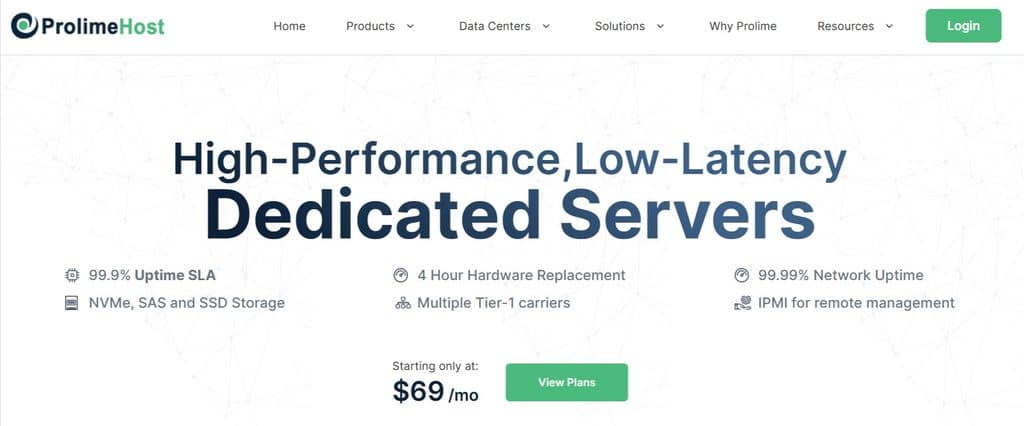
Businesses that have outgrown other hosting types for WordPress may find that dedicated hosting meets their needs for software, hardware, and server configuration resources. ProlimeHost offers dedicated server solutions for businesses to assess based on their performance, networking, data center, and support needs.
Why Choose ProlimeHost for WordPress Hosting?
ProlimeHost’s dedicated servers provide an option for businesses to host their WordPress sites and apps when their workloads require dedicated hardware. Its servers are connected by NTT, Level 3, Telia, and China Unicom. The quality of the service provider network and the routing used by the service provider can affect website availability and responsiveness to visitors in different geographic regions.
ProlimeHost has data center locations in Dallas, Los Angeles, New York, Utah, and Singapore. Hosting your data center in a location near your target audience can help ameliorate latency on your site. Its infrastructure provides power redundancy, and customers should review the SLA to assess reliability.
Server selection requires considering available CPU configurations, RAM, storage, and bandwidth. Suitable caching and server optimization can make a significant improvement to resource utilization. Such optimizations can aid heavy workloads.
Which WordPress Websites Can Benefit from ProlimeHost Dedicated Servers?
ProlimeHost dedicated servers can benefit several WordPress sites, including:
- High-traffic blogs and publications: Sites with a lot of content and frequent requests.
- WooCommerce stores: Stores with thousands of products and catalogs.
- Business sites: Sites where the company wants to control server settings and resources.
- Agency-managed sites: Agencies that manage multiple WP sites.
How to Choose the Right ProlimeHost Server
Determine where your site is now and where it will likely be in the near future. Look at your site’s resource consumption and traffic. Look at the available CPU, RAM, and storage configurations and consider the provided bandwidth, connectivity, and location of the data center. Consider management and security services and backup and support offerings.
To see what ProlimeHost offers, check out their dedicated server options and see if their plans fit your needs.
Key Features to Look for in a Dedicated Server for WordPress
Hardware elements are just one part of the equation for a dedicated WordPress server. Others include the efficiency of the OS and software, the power and performance of the server’s processor and memory, the speed and performance of the server’s storage and networking connections, and the available bandwidth. All of these affect the overall performance of the server and the sites it is hosting. The best combination of these elements will change as the site grows and evolves.
CPU Performance and Core Count
Each WordPress request is processed by the CPU along with other PHP and database-related requests. In addition, WordPress requires a CMS to process requests. A CPU with a higher clock speed will process requests faster, and a CPU with more cores will be able to process more requests at the same time. A site that has a lot of active visitors, dynamic requests, or resource-intensive plugins may benefit from having a CPU with a higher clock speed and more cores. Keep in mind that not all CPU cores are equal, and it may be better to have a couple of powerful cores as opposed to many weak cores. In addition, benchmarks for CPU performance are a better gauge of which CPU is best for a dedicated server as compared to core count.
6.2 RAM Capacity
RAM is used for processing PHP requests, operations on databases, and cached requests. RAM impacts site performance as well. If a site has a large number of visitors, active catalogs in WooCommerce, resource-intensive plugins, or a multisite installation of WordPress, additional RAM would likely improve site performance. The best approach is to monitor actual RAM utilization to determine what the threshold is and adjust configuration accordingly.
NVMe SSD Storage
Storing site files, database, and logs on fast storage improves site performance. In addition to performance gains related to database operations, other site requests are also cached, which provides an overall performance gain for a site. Keep in mind that storage, while fast, does not provide data backup and protection and should be used in conjunction with a backup solution.
Bandwidth and Network Connectivity
Check port speed and quality of networks and routing. Often latency is improved by placing the data center closer to the primary audience. A high-speed network port doesn’t necessarily mean faster page loads, as application performance, server configuration, and congestion, etc., can affect page loads.
Operating System and Software Compatibility
Check that the server supports a version of the operating system you need, PHP, and a database and web server of your choice. Additionally, check that the server meets the requirements of the latest version of WordPress, as well as the plugins you wish to use.
Server Management and Control Panel
Managed dedicated hosting may cover server maintenance and management, support, and monitoring. Otherwise, it’s up to you. A control panel can make management of your emails, databases, and domains easier. Make sure you understand what, if any, management tasks the host covers before signing on for a hosting plan.
Managed vs. Unmanaged Dedicated Servers for WordPress
There are options for businesses to choose how much server administration they wish to handle when choosing a WordPress dedicated server. Differences between managed and unmanaged hosting are in the level of technical assistance provided by the web host.
Managed Dedicated Servers
Providers set the boundaries of managed services in the scope of the agreement. Examples of managed services may include performance, security, monitoring, maintenance, updates, and support. This type of hosting provides businesses the benefits of using a dedicated server without the burden of managing the entire server infrastructure. This allows the business to allocate resources toward other areas of the company such as the website content and customer experience.
Unmanaged Dedicated Servers
In unmanaged dedicated hosting, customers are responsible for the entire infrastructure of the server. Customers are required to manage the server from installation and configuration to security and performance. This level of hosting may be appropriate for individuals and companies with the necessary in-house expertise to manage and administer a server.
Which Option Is Best for WordPress?
In general, if a business is unable to afford the time and money to manage a server, a managed server is the way to go. A managed server reduces the administrative burden. However, with unmanaged hosting, a user gets total control of the server. Ultimately, the key is finding a server agreement that is within the means of the customer. Before signing an agreement, review what services and support are included, what goes beyond the agreement, and the price of additional services.
How to Optimize a Dedicated Server for WordPress Performance
Although a dedicated server provides a lot of flexibility with resources and configuration, how the server and the WordPress site are optimized impacts performance as well. By utilizing various techniques, one can reduce overhead, improve site response times, and allow the site to handle more concurrent visitors.
Configure Server-Side Caching
Server-side page caching stores previously generated page outputs. If page outputs are cached, they don’t need to be dynamically generated for each request. Frequently used database query outputs can be cached, as well. There should also be some rules to determine what dynamic pages need to be cached and what pages need to be cached only for a limited time.
Optimize PHP and Database Settings
PHP can also be configured to run as a different user, and then that user can be granted specific database user permissions.
Use a supported PHP version compatible with your WordPress installation and plugins. Configure the PHP-FPM worker processes to match your CPU and memory resources to avoid excessive resource consumption. Perform database optimization and review slow queries and indexing to enhance performance. Monitor resource consumption before making changes to server configurations.
Use a Content Delivery Network
A content delivery network (CDN) distributes static assets, such as images, stylesheets, and JavaScript files, to edge locations. A CDN can improve website performance by delivering content to users from a location that is closest to them. This can reduce the number of requests to the origin server.
Optimize Themes, Plugins, and Media
Ensure you use the right image formats and compress your media before uploading. Delete unneeded plugins and themes and use efficient and well-maintained software. Review scheduled tasks and database queries that are resource-intensive.
Monitor Performance Regularly
Keep an eye on uptime, server logs, disk usage, and CPU/RAM utilization. Load testing can identify performance bottlenecks. Make config changes or add additional resources based on what you find during load testing.
Dedicated Server Security Requirements for WordPress
Securing a dedicated server is important to securing a WordPress site from unauthorized access and hacking, among others. However, the user still has to proactively monitor and update the dedicated server for proper security.
To begin, here are some tips to better secure your server.
- Firewall and Access Controls: Restrict any access and/or connections that are unnecessary and/or unrelated. Use administrative access keys, where necessary, and permissions to restrict access only to that which is absolutely required.
- Software Updates: Keep the server’s core and related services (OS and PHP) updated and patched, as well as the WordPress core, themes, and Plugins. Uninstall any software that is no longer needed.
- Monitoring: Keep security monitoring and malware detection software to help identify and stop potential threats, and monitor access and activity logs for suspicious activities, traffic, and file transfers.
- DDoS Mitigation and Network Security: Inquire with the host about DDoS mitigation services and understand its scope, as well as the limitations and response time.
- Backup and Recovery: Back up the data and store the backups offsite. Restore the data to test the recovery procedures.
- SSL/TLS: Use SSL/TLS certificates and related software to secure the connection.
Effective security and protection still depend on proper planning, configuring, maintaining, and reliably recovering the servers.
How Much Does a Dedicated Server for WordPress Cost?
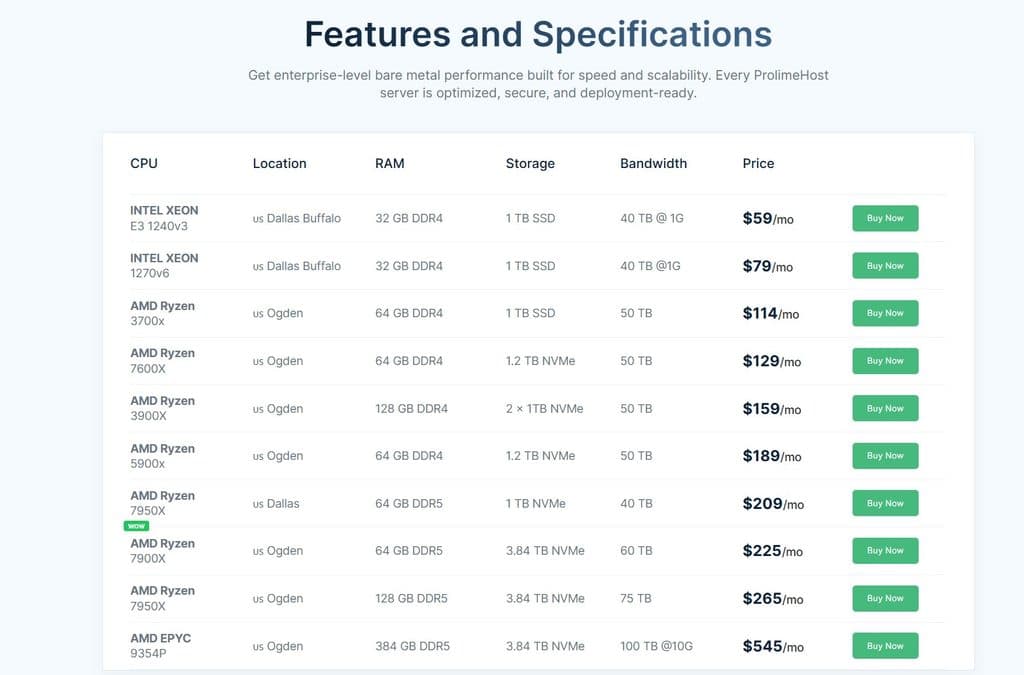
A WordPress dedicated server’s cost is determined by factors such as the hardware specifications, the hosting features, and the level of support. Faster hardware such as more powerful CPUs and larger or faster NVMe storage usually comes at a higher cost. Servers also vary based on their bandwidth allowance and data center connectivity.
WordPress dedicated servers can be managed or unmanaged. Managed hosting means the service provider takes care of some server administration and maintenance tasks and therefore costs more. With unmanaged hosting, a business may also incur costs of hiring a system administrator to manage the server and/or pay for technical support.
Costs related to the server may include a control panel, server software, server backups, and other server add-ons. These should be considered when comparing dedicated server WordPress hosting plans.
When looking for the most economical option, consider that the cheapest may not offer reliable support and the features a business needs. Furthermore, a business may not need the capabilities of the most expensive dedicated server and thus incur an unnecessary cost. When considering your website’s performance, security, and anticipated growth, the total cost of a WordPress dedicated server should be evaluated against the website’s performance requirements. This will help you identify a server that provides the most value without having to compromise essential features.
How to Choose the Best Dedicated Server for WordPress
To choose the best WordPress dedicated server, take the time to analyze your current and future needs. Use this checklist to compare various WordPress hosting options.
- Current and anticipated traffic: Consider the number of visitors your site gets and expects, as well as the number of concurrent users. You may need to accommodate traffic spikes as well.
- Identify your resource needs: Analyze load average, average CPU and RAM utilization, database activity, and the utilization of resource-intensive plugins to understand your workload.
- Choose the right storage: Understand the differences in the performance and capacity of NVMe storage options. Make sure you understand the backup and recovery procedures.
- Decide on server management: Determine if your team can perform the needed configuration, maintenance, and updates, or if you need to use a managed server.
- Review the firewall and DDoS protection: Understand the process for backups and recoveries, and check the firewall configuration.
- Look at the data center locations: Compare the connections and the allowable bandwidth, based on your target audience.
- See if they support what you need: Check the process and costs for scaling. Understand the changes in offered services and cost.
The best dedicated server is the one that meets your current needs and leaves room for growth. Make sure to consider the whole package, not just hardware or the starting price.
Frequently Asked Questions
Is a Dedicated Server Good for WordPress Hosting?
A dedicated server can be a great option for a high-traffic WordPress site. Due to the nature of some publishing or e-commerce sites, a dedicated server can be a good choice for those looking for full control of a server’s resources. For smaller sites, a shared server or VPS can be a good and cheap option.
How Much RAM Does a WordPress Dedicated Server Need?
The amount of RAM needed depends on site traffic, plugins, database activity, caching, and how many sites are hosted on the server. A good starter configuration would be a server with 16-32 GB of RAM. More resource-intensive sites like a large WooCommerce site or multisite installation may need more RAM. Only configure the server to have the resources needed.
Is a Dedicated Server Faster Than VPS Hosting for WordPress?
A dedicated server can be a good option if full control of a server’s hardware is needed and other servers on the same host do not impact performance. Due to the nature of a dedicated server, performance is good but can vary based on the hardware and how it’s configured.
Do I Need Managed Dedicated Hosting for WordPress?
If a user is able to manage the server, update it, and secure it, an unmanaged server can be a good option. For those who don’t want to manage the server, a managed server can be a good option.
Can I Host Multiple WordPress Websites on One Dedicated Server?
Yes. Plenty of resources, proper account and security controls, and management of resources can allow multiple sites to be hosted on the same server.
Is Dedicated Hosting Worth It for WooCommerce?
Dedicated servers are worth it if your WooCommerce site has a big product catalog, lots of page views and visitors, and/or has a busy checkout process and database. Factor in resource usage to see if less expensive hosting can work.
Which Dedicated Server Is Best for a High-Traffic WordPress Website?
Because of the design of WordPress, a good server for it should have good CPU performance, high RAM, and NVMe storage. The server should also have good network connectivity and support a good caching mechanism. Look at the management and security features and see how flexible the server is for upgrades to compare prices and options.
Conclusion
There are many factors to consider when you’re choosing a dedicated server for WordPress: performance, cost, reliability, and security. The CPU, RAM, and NVMe storage of the server impact performance, and network connectivity impacts reliability. To further increase reliability, find a server with a good management system. Security and flexibility for upgrades also impact cost. The right server configuration is a balance of all of these for your site’s current load, expected load, and technical requirements. To learn more about the options available at ProlimeHost, visit their site.


